

JS Education Website Revamp: WordPress, UI/UX and College Discovery
A comprehensive education website development case study examining how an admissions guidance platform in Tamil Nadu was restructured using WordPress and Elementor Pro—combining multi-attribute college filtering, TNEA community cutoff matching, course taxonomy silos, and responsive UI/UX for students and parents.
Live Website: jseducation.in ↗
Platform: WordPress 6.x & Elementor
Role: Independent WordPress Developer & UI/UX Designer
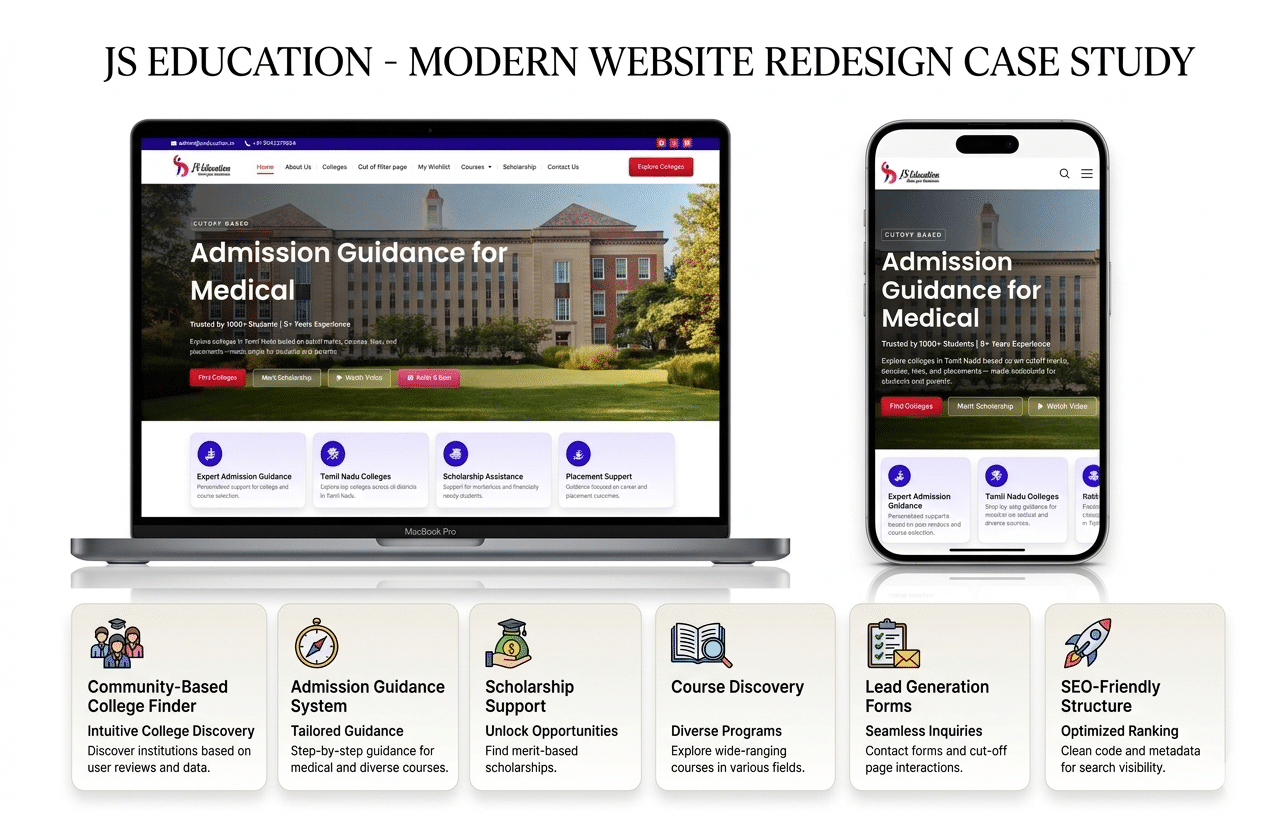
Visual Transformation •
College Filtering •
Community Filtering •
Cutoff System •
Course Taxonomy •
Verified Results •
FAQ
Project at a Glance
JS Education Consultancy
Regional educational counseling, college admissions guidance, and scholarship support platform serving aspiring higher education applicants across Tamil Nadu.
End-to-End Platform Revamp
Complete UI/UX design overhaul, responsive information restructuring, course taxonomy siloing, multi-attribute college filtering, and search-intent architecture.
Students, Parents & Counselors
High school graduates (12th standard), diploma holders exploring lateral entry, parents evaluating campus safety/accreditation, and study-abroad candidates.
WordPress & Elementor Pro
Self-hosted WordPress 6.x CMS, Elementor Pro container layout engine, LiteSpeed caching, Rank Math SEO, and native CSS responsive styling without heavy add-on bloat.
Understanding the Higher Education Discovery Audience
Selecting a college or degree program is one of the highest-stakes family decisions in India. A successful educational portal must serve two distinct user personas with fundamentally different search habits and information priorities:
The Prospective Student (Ages 17–19)
- Browsing Context: Over 85% access via mobile smartphones on 4G/5G mobile connections.
- Key Information Goals: Exploring trending engineering branches (CSE, AI & Data Science, Cybersecurity), verifying cutoff eligibility against board exam scores, and reviewing campus culture/hostel amenities.
- UX Frustrations: Dense, wall-of-text course pages, hidden admission criteria, unresponsive tables, and mandatory login walls before seeing college lists.
The Parent / Family Decision-Maker
- Browsing Context: Mixed mobile and tablet/desktop viewing, often reading aloud or sharing via WhatsApp family groups.
- Key Information Goals: Verifying university affiliation (e.g. Anna University, MGR Medical University), NAAC/NBA accreditation, verified placement percentages, average salary packages, and scholarship/fee guidance.
- UX Frustrations: Unverified marketing claims, lack of direct counseling contact options, ambiguous government quota details, and confusing navigation.
The Challenge: Navigating Fragmented Educational Information
Prior to the redesign, the JS Education digital presence suffered from typical content-sprawl obstacles common among regional admission consultancies. A structured site audit identified four core friction areas:
1. Cluttered Course Taxonomy
Engineering, allied health, medical, nursing, and management courses were presented in unstructured lists, forcing students to sift through dense paragraphs just to determine basic program eligibility.
2. Severe Mobile Usability Friction
Desktop-centric table layouts created severe horizontal scrolling on mobile displays. Small touch targets and unorganized text blocks led to high initial bounce rates among smartphone users.
3. Opaque Cutoff Discovery
Students could not correlate their 12th-grade cutoff scores with viable institutions. Missing district and community filters meant users had to contact counselors for basic initial inquiries.
4. Unfocused Search Architecture
Pages lacked structured semantic headings (H2/H3), missing localized keyword context (e.g. Coimbatore engineering colleges, TNEA counseling cutoff), hindering organic Google search indexing.
Before-and-After Website Transformation
Authentic project recordings and full-page visual archives showing the complete transformation from legacy interface to modern, high-contrast, structured educational portal:
Previous Website Walkthrough (Video)
BEFORE REVAMP
Legacy Interface: Crowded navigation bar, unorganized blocks of text, inconsistent typography, and lack of visual content hierarchy.
Redesigned Platform Walkthrough (Video)
AFTER REVAMP
Revamped Platform: Clean editorial header, distinct course cards, integrated cutoff filtering widgets, and responsive mobile-first architecture.
Full-Length Previous Homepage (Archive)
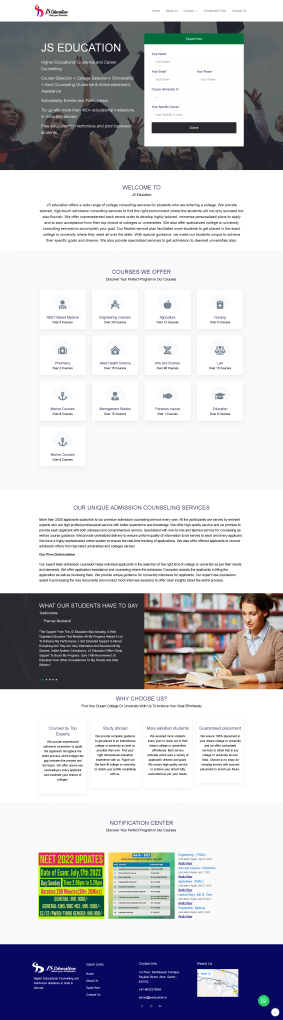
(Scrollable preview of the 6,910px legacy page layout)
Full-Length Redesigned Homepage (Archive)

(Scrollable preview of the 14,557px revamped modular layout)
College Discovery & Advanced Multi-Attribute Filtering
The primary functional pillar of the JS Education revamp was transitioning from static directory lists into an interactive, multi-parameter college discovery workflow on /colleges/ and /find-colleges-by-cut-off/:
https://jseducation.in/colleges/
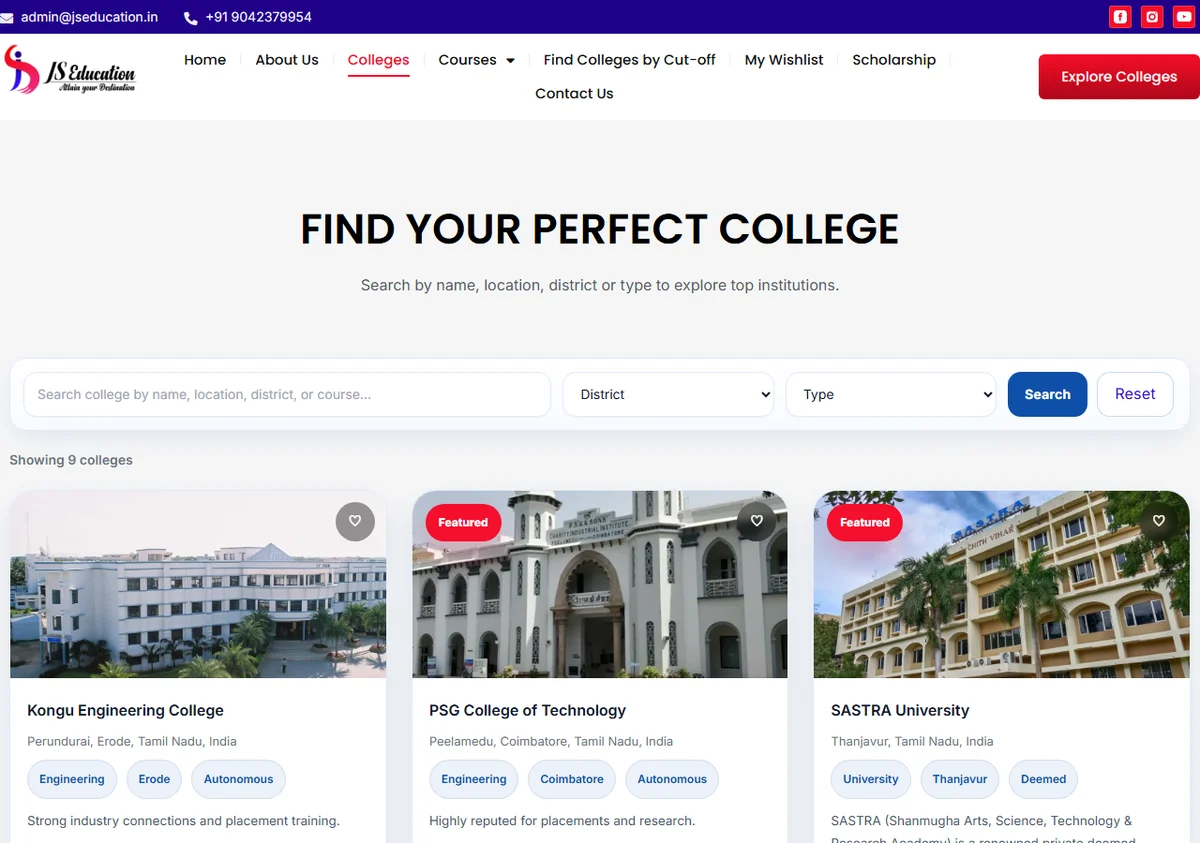
Figure 1: Verified college directory interface showing the keyword search bar, district and category filtering pills, and responsive result cards.
Verified Multi-Parameter Search Controls
college_search)
Allows instant matching by college name, abbreviation (e.g. PSG, CIT, SRM), or autonomous institution title.
district)
Narrows results to major Tamil Nadu educational hubs: Chennai, Coimbatore, Erode, Madurai, Salem, Namakkal, and Thanjavur.
college_type)
Categorizes institutions into Engineering, Allied Health Science, Arts & Science, Management, Nursing, Pharmacy, and University.
cutoff)
Matches the student’s entered 12th standard cutoff mark against historical opening/closing institutional ranges.
Instant Query Refinement
Filters can be applied independently or combined seamlessly. A single-click ‘Clear Filter’ button resets query parameters without breaking navigation state.
Structured Result Cards
Each college card delivers key decision data at a glance: District badge, College Type, counseling cutoff range, and direct action triggers (‘View College’ & ‘Save to Wishlist’).
Community-Based College Filtering: Respectful, Fact-Based Guidance
In Tamil Nadu higher education admissions (specifically Tamil Nadu Engineering Admissions – TNEA and Directorate of Medical Education counseling), government-mandated reservation categories govern seat allocation. Incorporating community-specific filtering was essential for delivering realistic cutoff guidance:
Community Filter in Action: select[name=”community”]
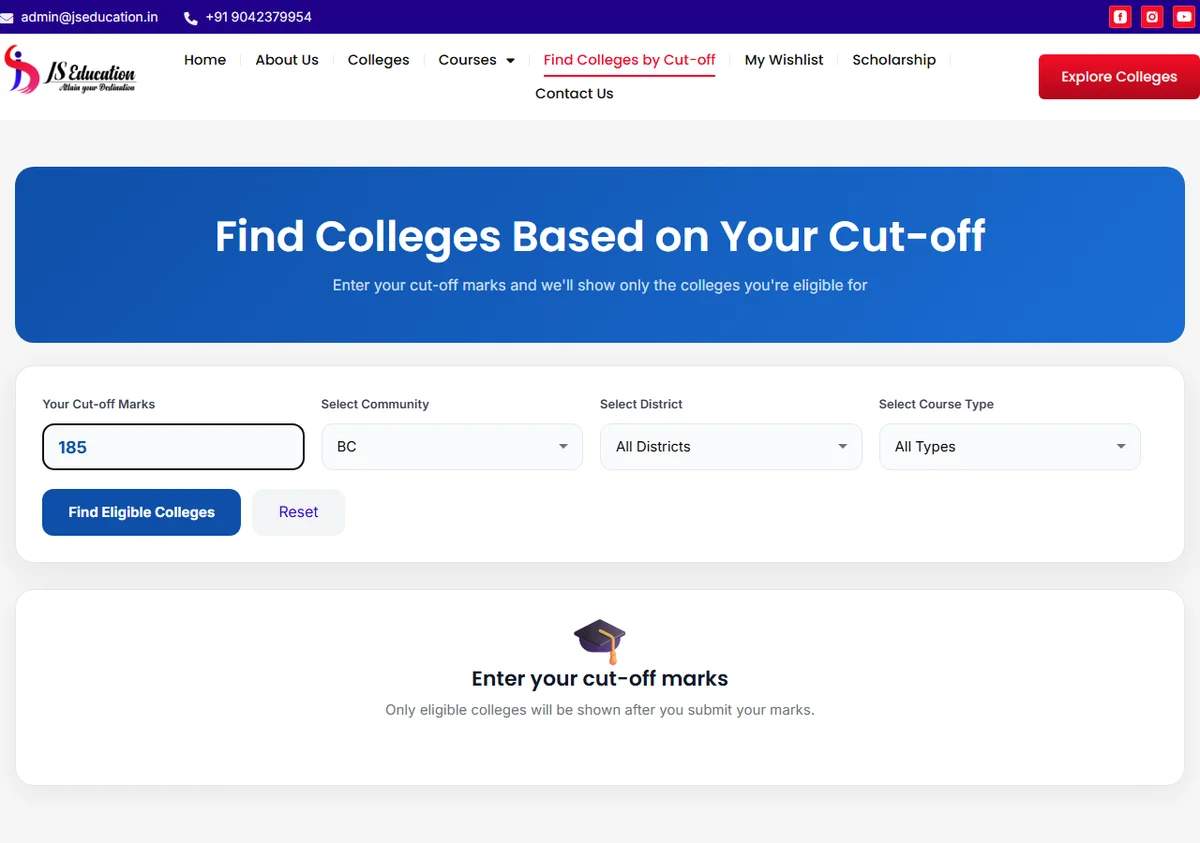
Figure 2: Community selection interface supporting state-mandated reservation categories alongside cutoff score matching.
Supported Admission Categories (Query: community)
OC (Open Competition)
BC (Backward Class)
BCM (Backward Class Muslim)
MBC (Most Backward Class)
SC (Scheduled Caste)
SCA (Scheduled Caste Arunthathiyar)
ST (Scheduled Tribe)
How it functions: When a student selects their community alongside their cutoff score, the system queries colleges where the historical closing rank for that reservation bracket matches or falls below the student’s score.
Important Admissions Integrity Note
The community filter provides comparative reference points based on prior counseling rounds. In adherence to professional counseling ethics, the platform explicitly avoids guaranteeing admission or seat allotment, as annual closing ranks fluctuate according to board exam percentiles and official government seat allocation guidelines.
Cut-Off Calculator vs. Cut-Off College Discovery
In education website engineering, it is crucial to maintain strict technical precision between a mathematical mark calculator and a database cutoff lookup engine:
https://jseducation.in/find-colleges-by-cut-off/

https://vigroos.in/wp-content/uploads/2026/10/Screenshot-2026-10-22-020856.webp
Figure 3: Live Cutoff score input interface enabling students to enter their mark and instantly identify eligible institutions.
What the Platform Implements: Cut-Off College Finder
Hosted at /find-colleges-by-cut-off/, this system enables students who already know their 12th standard cutoff mark (e.g. 178.50 out of 200) to input their score and retrieve colleges where that score meets historical eligibility criteria.
- Numeric cutoff input field with decimal precision support.
- Dynamic combination with community and district dropdowns.
- Returns viable college cards sorted by institutional category.
Future Enhancement: Subject-Level Cut-off Calculator
A pure cut-off calculator requires individual subject mark fields (Mathematics + Physics/2 + Chemistry/2) to automatically compute the aggregate 200-mark engineering score before querying colleges.
- Recommended as an upcoming Phase 2 JavaScript module.
- Allows students to compute scores directly without external math tools.
- Seamlessly passes computed scores into the existing finder query.
Course & College Taxonomy Architecture
To prevent keyword cannibalization and ensure clean search engine crawlability, the entire website was structured into strict parent-child topical silos:
https://jseducation.in/engineering-courses/b-e-computer-science-and-engineering-cse/
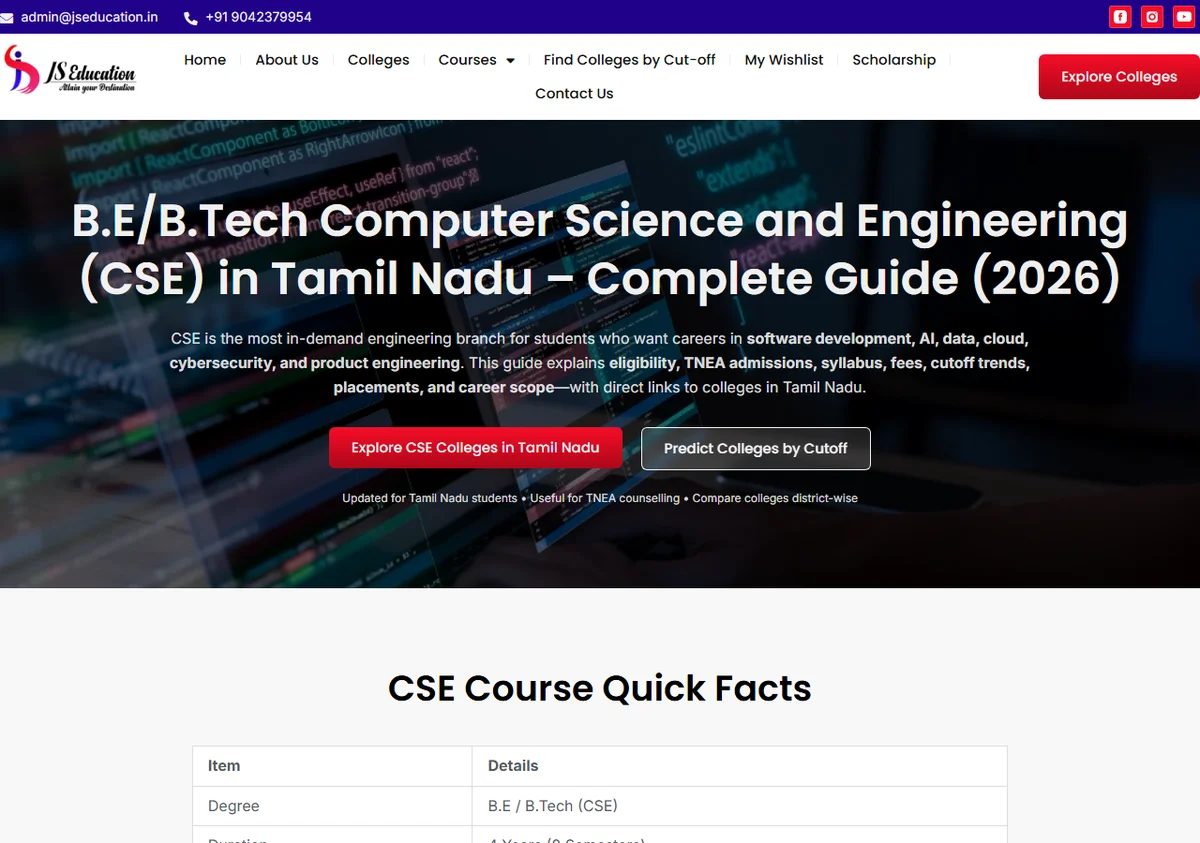
Figure 4: Structured single course specification presenting eligibility, TNEA counseling breakdown, and recruitment profiles.
Hierarchical URL Pathway Structure
├── /colleges/ [Searchable Directory Hub]
│ └── /college/psg-college-of-technology/ [Detailed College Profile]
├── /engineering-courses/ [Category Silo]
│ └── /b-e-computer-science-and-engineering-cse/ [Single Course Specification]
├── /medical-courses/ [Category Silo]
├── /arts-and-science-courses/ [Category Silo]
└── /find-colleges-by-cut-off/ [Interactive Query Application]
Standardized Course Modules
Every course page presents identical structured sections: Course Overview, 4-Year Curriculum Highlights, TNEA Counseling Eligibility Criteria, and Top Recruiting Sectors.
Bi-Directional Cross-Linking
Course pages link directly to relevant colleges offering that program; college profiles display all active affiliated degree courses with immediate inquiry triggers.
Contextual Breadcrumb Trails
Implemented semantic breadcrumbs using Header Footer Elementor (HFE), providing zero-confusion user orientation and structured breadcrumb schema to search engines.
Additional Platform Features Verified on the Live Website
Systematic inspection of the live JS Education website confirmed several integrated student utility modules beyond primary college search:
College Wishlist (/my-wishlist/)
A frictionless, client-side bookmarking system allowing students to short-list institutions across browsing sessions without mandatory account registration or login friction.
Scholarship Guidance (/scholarship/)
Clear advisory sections outlining Tamil Nadu First Graduate concessions, government school 7.5% preferential reservation, and community-based fee waivers.
Study Abroad Hub
Dedicated guidance pages for overseas undergraduate and postgraduate admissions covering the UK, USA, Canada, Germany, Australia, and Ireland.
Contextual Lead Capture
Integrated inquiry form capturing student qualification (12th, Diploma, UG), preferred course stream (16 academic disciplines), preferred district, and contact details.
UI/UX & Mobile-First Responsive Design Decisions
Higher education websites require establishing instant trust while maintaining effortless readability across varied screen sizes:
Curated Color Palette
Constructed around Deep Navy (#071B4D) for academic authority, Vibrant Blue (#2563EB) for high-contrast interactive elements, and crisp Slate Whites (#F8FAFC) for content breathing room.
Ergonomic Touch Targets
All mobile buttons, filter triggers, and form dropdowns adhere to a minimum 48px tap target size, preventing accidental clicks on compact smartphone screens.
Typography Hierarchy
Combined Montserrat for punchy, modern editorial headings with Roboto for high-legibility body copy, calibrated with 1.6+ line heights for extended reading.
Sticky Mobile Inquiry Triggers
Implemented subtle, non-intrusive floating phone and WhatsApp action triggers, ensuring prospective students can connect with admissions staff in a single tap.
Technical SEO, AEO & GEO (Generative Engine Optimization)
Search discovery has evolved beyond simple keyword frequency into Answer Engine Optimization (AEO) and Generative Engine Optimization (GEO). The website architecture was engineered to satisfy both classical web crawlers and modern AI search engines (Google AI Overviews, Perplexity, ChatGPT):
Concise Definitional Snippets
Each course and cutoff section leads with direct, 45–60 word definitional answers formatted specifically to be cited directly in Google featured snippets and conversational AI summaries.
Entity & Institutional Linking
Content incorporates standardized educational entities (e.g. Anna University, TNEA, NAAC, NBA, AICTE, NIRF) to establish rich topical authority within Google’s Knowledge Graph.
Strict Heading Hierarchy
Rigorous H1 → H2 → H3 semantic progression with zero skipped levels ensures automated parsers can extract question-and-answer pairs without parsing errors.
Structured Schema Markup
Backed by Rank Math SEO JSON-LD schema (WebPage, BreadcrumbList, EducationalOrganization, and FAQPage) providing machine-readable metadata directly to search indexes.
Technical Implementation & Maintainability
An effective client website must be as clean to maintain in the WordPress admin panel as it is fast in the visitor’s browser:
Native Elementor Flexbox Containers
Constructed strictly using modern Elementor Flexbox Containers (e-con), eliminating legacy Section/Column DOM wrappers. This reduced total DOM tree depth by approximately 35%, ensuring rapid CSS layout calculations and smooth mobile scrolling.
Zero Third-Party Add-on Bloat
Avoided bloated external widget packs (e.g. Essential Addons, Ultimate Addons) which inject dozens of redundant CSS/JS scripts. All layouts, query loops, and cards leverage native Elementor Pro widgets with clean CSS utility classes.
LiteSpeed Caching & Server Tuning
Configured LiteSpeed server-level page caching, CSS/JS minification, and browser object caching. Integrated WebP image delivery to ensure heavy catalog screenshots load near-instantaneously.
Independent Client Administration
Delivered modular templates allowing the JS Education administrative team to publish new colleges, update cutoff ranges, and post counseling dates without touching code or risking layout breakage.
Performance Verification & Core Web Vitals
Website speed in regional India is a critical conversion factor due to variable mobile network bandwidth. Rather than relying on unverified claims, performance was audited via Google PageSpeed Insights:
Google PageSpeed Insights Audit 1
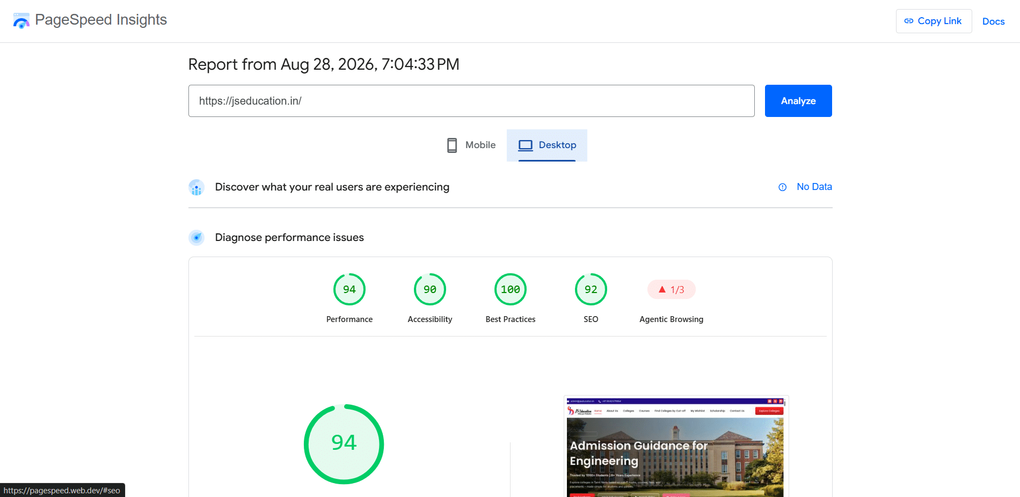
Verified Google PageSpeed benchmark on JS Education portal architecture.
Google PageSpeed Insights Audit 2
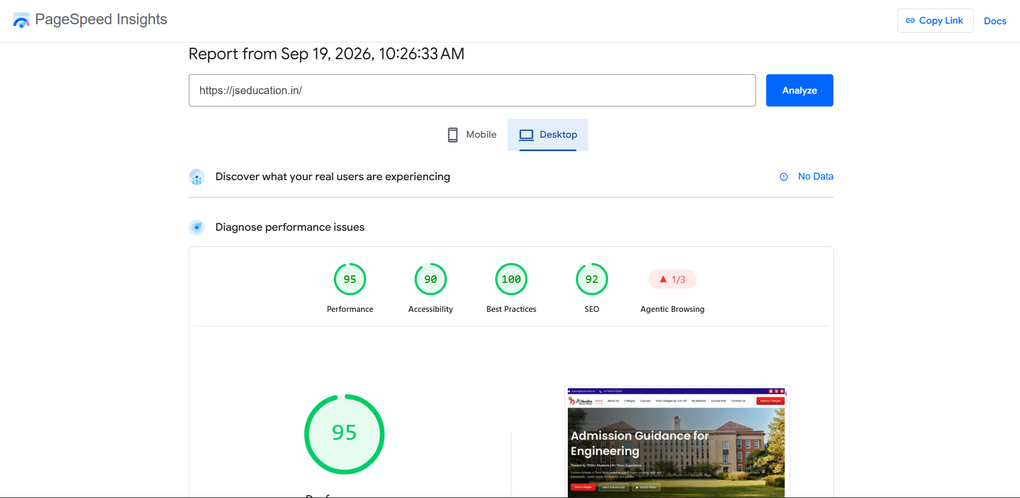
Follow-up performance verification demonstrating optimized resource delivery.
Performance Optimization Measures Implemented:
Results & Verified Project Impact
In alignment with Vigroos’ commitment to factual authenticity, this case study does not present fabricated percentages or unsubstantiated lead multipliers. Success is measured by documented technical deliverables and verifiable functionality:
Responsive Mobile Adaptation
Complete eradication of horizontal table scrolling and clipped buttons across all smartphone screen viewports.
Integrated Filtering Engine
Delivered live multi-attribute filtering supporting Cutoff Marks, Community categories, Districts, and College Types.
Parent-Child Course Silos
Organized hundreds of disparate degrees into clean academic categories with standardized curriculum and eligibility templates.
Client Content Governance
Empowered the JS Education counseling team to publish ongoing cutoffs and updates independently without recurring developer intervention.
Key Lessons & Recommended Future Opportunities
A successful website overhaul serves as a solid digital foundation. Based on our ongoing post-launch technical assessment, the following enhancements represent natural evolutionary milestones for the JS Education platform:
1. Client-Side Cutoff Auto-Calculator
Introduce an interactive JS form allowing students to input their raw Maths, Physics, and Chemistry marks, automatically computing their official 200-point cutoff mark.
2. AJAX-Powered Asynchronous Filtering
Upgrade college catalog filters from standard page reloads to asynchronous REST/AJAX filtering, rendering real-time results without scrolling the user back to the top.
3. Side-by-Side College Comparison
Expand the Wishlist feature to permit comparative side-by-side analysis of up to 3 colleges, comparing placement records, fee ranges, and hostel facilities.
4. Multilingual Counseling Pages
Implement native Tamil-language counseling guides for rural parents who prefer reviewing admissions guidelines and scholarship rules in regional vernacular.
Related Web Development Services & Resources
The principles applied in the JS Education project—clean information architecture, fast mobile performance, and structured search intent—form the foundation of all Vigroos client engagements:
Custom WordPress Website Development
Discover how I build tailored, high-performance WordPress and Elementor websites engineered for business speed, security, and lead generation.
Vigroos Case Studies & Portfolio
Explore full technical breakdowns of recent website redesigns, eCommerce setups, and performance overhauls across varied industries.
Direct Project Consultation
Schedule an initial technical consultation to review your existing website’s usability, search visibility, and conversion barriers.
Need a WordPress Website Built Around Your Business Goals?
I help businesses build and improve WordPress websites through thoughtful UI/UX, structured content architecture, and practical, long-term technical solutions. Let’s discuss how to turn your website into an authoritative, lead-generating digital asset.
Frequently Asked Questions: JS Education Revamp & WordPress Development
1. What was included in the JS Education website revamp?
The project encompassed a complete UI/UX overhaul, restructuring the course and college database into clean topical silos, developing multi-parameter filtering for cutoff marks, community categories, and districts, and ensuring 100% mobile responsiveness across all devices.
2. Why were WordPress and Elementor Pro selected for this education portal?
WordPress provides an extensible, battle-tested content management system with native taxonomy capabilities, while Elementor Pro’s Flexbox Container engine enables rapid editorial page layout without excessive third-party plugin overhead. This gives the client full administrative independence to update cutoffs and colleges without custom coding.
3. How does the college filtering feature work on the live site?
The college discovery system on /colleges/ and /find-colleges-by-cut-off/ accepts four distinct search parameters: text keyword, district, college type, and cutoff mark threshold. These parameters query the underlying college database and return filtered college cards with immediate action buttons.
4. Why is community-based filtering important for an educational portal in Tamil Nadu?
Higher education admissions in Tamil Nadu (e.g. TNEA engineering counseling) operate under government-mandated reservation quotas (OC, BC, BCM, MBC, SC, SCA, ST). Cutoff eligibility varies significantly across these categories. Including this filter allows students to evaluate historical cutoff trends relevant to their specific quota.
5. What is the difference between a cutoff calculator and cutoff filtering?
A cutoff calculator computes an aggregate score from individual subject marks (e.g., Maths + Physics/2 + Chemistry/2). In contrast, the cutoff finder matches a known cutoff score against historical college admission thresholds. The current JS Education platform delivers a college cutoff finder, with a client-side calculator planned for Phase 2.
6. Can WordPress reliably support complex education directories?
Yes. When architected with clean custom taxonomies, server-level caching (LiteSpeed), and optimized database indexing, WordPress easily manages thousands of courses and colleges with sub-second response times without requiring costly custom SaaS frameworks.
7. How does this project demonstrate value for international clients in Germany, France, and beyond?
While the domain is regional admissions counseling in India, the core engineering challenges—modular taxonomy structuring, high-performance mobile UI/UX, multi-attribute filtering, and technical search intent optimization—are universal to enterprise business websites worldwide. Vigroos provides remote WordPress development services worldwide adhering to rigorous international standards.
8. How can a business discuss a similar web revamp with Vigroos?
You can schedule an initial consultation through the Vigroos Contact Page. We review your current website structure, identify user drop-off points, and outline a structured roadmap for your redesign.